AIFF - Audio Interchange File Format, The Gold Standard for Uncompressed Audio
What is an AIFF file?
Developed by Apple in 1988, the AIFF (Audio Interchange File Format) is a high-fidelity, uncompressed audio standard. Its underlying structure is based on the EA IFF 85 format from Electronic Arts, originally created for Amiga systems. This foundation provides exceptional flexibility, allowing the format to store monaural or multichannel sampled sounds at a wide range of sample rates and bit depths. A key characteristic of AIFF is its uncompressed nature, which results in significantly larger file sizes compared to lossy alternatives like MP3.
A typical AIFF file contains 2 channels of CD-quality stereo audio, with a 16-bit sample size and a 44.1 kHz sample rate. This high quality means that even a brief 5-minute audio clip can consume approximately 50MB of disk space, a file size characteristic it shares with the similar WAV format.
Key Characteristics of AIFF Files
| Characteristic | Description |
|---|---|
| Audio Quality | Lossless & High-Fidelity. Perfect for critical listening, mastering, and archival. |
| File Extension | .aiff |
| File Size | Very Large. Significantly larger than lossy formats; comparable to WAV but often slightly larger due to metadata. |
| Metadata Flexibility | Excellent. The chunk system allows for rich metadata, markers, and instrument data, giving it an edge over simpler formats. |
| Software/Hardware Support | Universal. Read/write support across all professional audio software and most consumer media players. |
| Primary Use Case | Professional Audio Production. The go-to format for recording, editing, final masters, and audio sampling. |
AIFF vs WAV
The AIFF and WAV are the almost same in term of quality. Both of them use same PCM (pulse-code modulation) encoding, which makes them larger in size as compared to other lossy formats, such as, MP3, M4A. Some of the general differences are written in the table below:
| AIFF | WAV |
|---|---|
| Being used mostly for MAC | Mostly used for PCs |
| Allows for metadeta | Doesn’t allow for metadeta |
AIFF File Structure
The EA IFF 85 sets out an overall structure for storing data in files. An EA IFF 85 file consists of a number of chunks of data. A chunk is buliding block of AIFF file consists of some header information followed by data: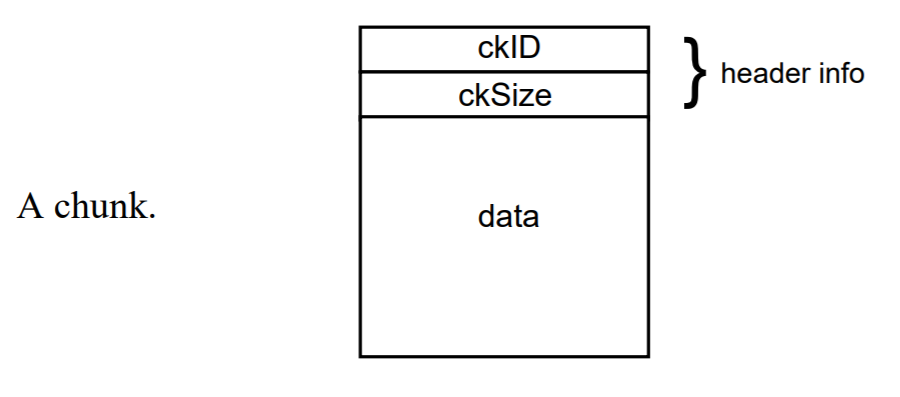
An AIFF file is a collection of a number of different types of chunks. There are two general types of chunks which are important to form an AIFF file chunk:
- Common Chunk: Contains important parameters describing the sampled sound, such as it’s length and sample rate.
- Sound Data Chunk: Contains the actual audio samples. There are many other optional chunks that list instrument parameters, define markers, store applicationspecific information, etc.
Local Chunk Types
The chunk types to form AIFF are given in the table below:
| Chunk Type | Description |
|---|---|
| Common Chunk | The Common Chunk describes fundamental parameters of the sampled sound |
| Sound Data Chunk | The Sound Data Chunk contains the actual sample frames |
| Marker Chunk | The Marker Chunk contains markers that point to positions in the sound data |
| Instrument Chunk | The Instrument Chunk defines basic parameters that an instrument, such as a sampler, could use to play back the sound data |
| MIDI Data Chunk | The MIDI Data Chunk can be used to store MIDI data |
| Audio Recording Chunk | The Audio Recording Chunk contains information pertinent to audio recording devices |
| Application Specific Chunk | The Application Specific Chunk can be used for any purposes whatsoever by manufacturers of applications |
| Comments Chunk | The Comments Chunk is used to store comments in the FORM AIFF |
| Text Chunks - Name, Author, Copyright, Annotation | All are text chunks |
FAQ
Q1: Is AIFF better quality than MP3?
A: Yes, AIFF is a lossless format that preserves all original audio data, while MP3 is a lossy format that sacrifices quality for a smaller file size.
Q2: Can I play AIFF files on my iPhone?
A: Yes, iPhones and iTunes natively support playback of AIFF files without any conversion needed.
Q3: What is the main advantage of using AIFF over WAV?
A: The main advantage is AIFF’s more robust built-in support for metadata, such as markers and sampler information, which is useful in music production.
Q4: Are AIFF files used for burning CDs?
A: Yes, AIFF is a standard format for audio CD mastering, as it meets the Red Book standard for CD-DA (Compact Disc Digital Audio).
Q5: How do I convert an AIFF file to MP3?
A: You can convert AIFF to MP3 using software like Audacity (free), iTunes, or any online audio converter to reduce the file size for portable use.