DHTML - Dynamic HTML File Format
What is a DHTML file?
A file with a .dhtml extension is a dynamic HTML file that is used to creating dynamic contents of a webpage. A web element created in DHTML is event driven and does not require to reload the page. In most of the cases, a DHTML file is used to create the dynamic contents of a webpage such as drop-down menus, floating layers, rollover buttons, and other dynamic content. You come across dynamic html elements almost daily in your life when you hover mouse on a menu item and it opens further sub-menu options. DHTML makes use of web technologies such as HTML, Javascript, HTML DOM, HTML Events and CSS to achieve the dynamic behaviour of elements.
DHTML File Format
DHTML files are plain text files that contain DHTML code to implement the dynamic behaviour of the web elements.
DHTML DOM
The DHTML Document object Model (DOM) is based on the HTML DOM that is a tree-structure with elements, attributes and text as shown in the following image.
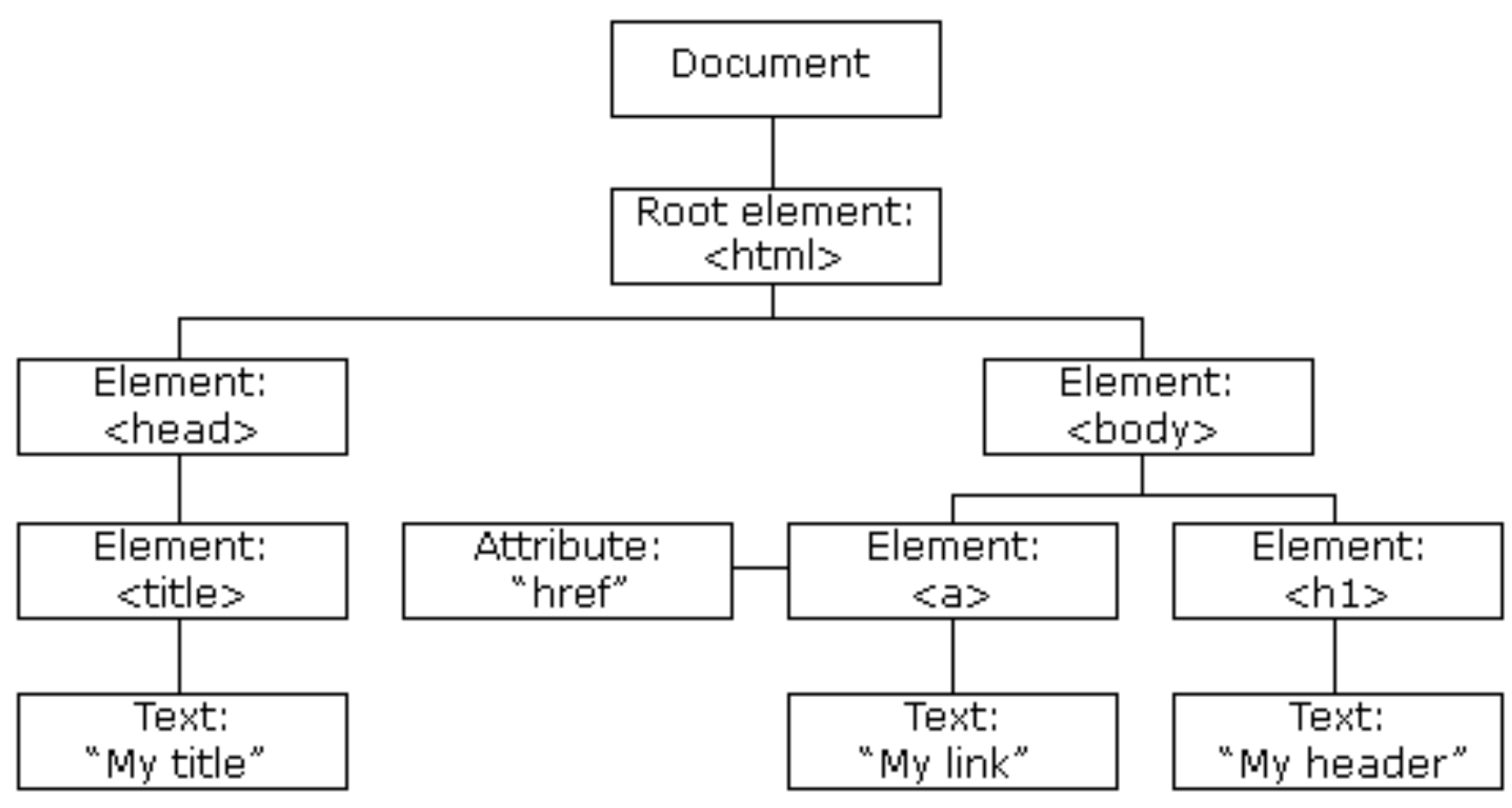
The Document node can be used to call several functions to implement different functionality. The following example simply uses the document.write() method of JavaScript in the DHTML.
<HTML>
<head>
<title>
Method of a JavaScript
</title>
</head>
<body>
<script type="text/javascript">
document.write("Hello World");
</script>
</body>
</html>
This code writes the text “Hello World” to output in browser.
DHTML Events
| S.No. | Event | Occurence |
|---|---|---|
| 1 | onabort | It occurs when the user aborts the page or media file loading. |
| 2 | onblur | It occurs when the user leaves an HTML object. |
| 3 | onchange | It occurs when the user changes or updates the value of an object. |
| 4 | onclick | It occurs or triggers when any user clicks on an HTML element. |
| 5 | ondblclick | It occurs when the user clicks on an HTML element two times together. |
| 6 | onfocus | It occurs when the user focuses on an HTML element. This event handler works opposite to onblur. |
| 7 | onkeydown | It triggers when a user is pressing a key on a keyboard device. This event handler works for all the keys. |
| 8 | onkeypress | It triggers when the users press a key on a keyboard. This event handler is not triggered for all the keys. |
| 9 | onkeyup | It occurs when a user released a key from a keyboard after pressing on an object or element. |
| 10 | onload | It occurs when an object is completely loaded. |
| 11 | onmousedown | It occurs when a user presses the button of a mouse over an HTML element. |
| 12 | onmousemove | It occurs when a user moves the cursor on an HTML object. |
| 13 | onmouseover | It occurs when a user moves the cursor over an HTML object. |
| 14 | onmouseout | It occurs or triggers when the mouse pointer is moved out of an HTML element. |
| 15 | onmouseup | It occurs or triggers when the mouse button is released over an HTML element. |
| 16 | onreset | It is used by the user to reset the form. |
| 17 | onselect | It occurs after selecting the content or text on a web page. |
| 18 | onsubmit | It is triggered when the user clicks a button after the submission of a form. |
| 19 | onunload | It is triggered when the user closes a web page. |